Imagine holding a tiny, intricate castle in your hands—a feat only a high-quality resin 3D printer can achieve—and that’s exactly what makes choosing the right model so essential. You’re looking for something that balances precision, speed, and ease of use, all while allowing your creativity to run wild. From large build volumes for bigger projects to ultra-fine resolutions that capture every detail, the best resin 3D printers push boundaries and elevate your work. Ready to see what’s possible?
| Creality HALOT R6 Resin 3D Printer with LCD | 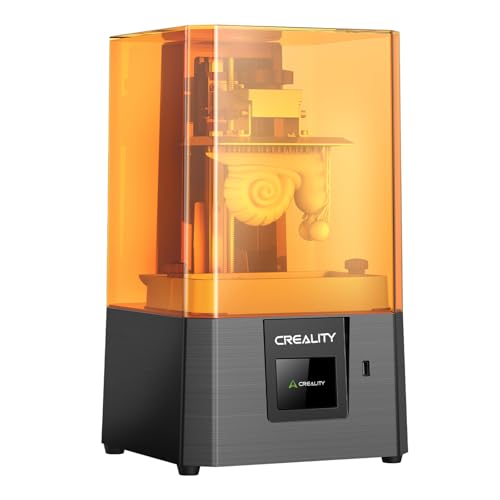 | User-Friendly Simplicity | Display Size: 6.08-inch LCD | Resolution: 2K (2560×1440) | Build Volume: ~4.72 x 2.68 x 6.3 inches | VIEW LATEST PRICE | Read Our Analysis |
| ANYCUBIC Photon Mono M7 PRO 3D Resin Printer |  | High-Speed Precision | Display Size: 10.1-inch LCD | Resolution: 14K (5120×13000) | Build Volume: 8.77 x 4.96 x 9.05 inches | VIEW LATEST PRICE | Read Our Analysis |
| ELEGOO Mars 5 Resin 3D Printer with 4K LCD | 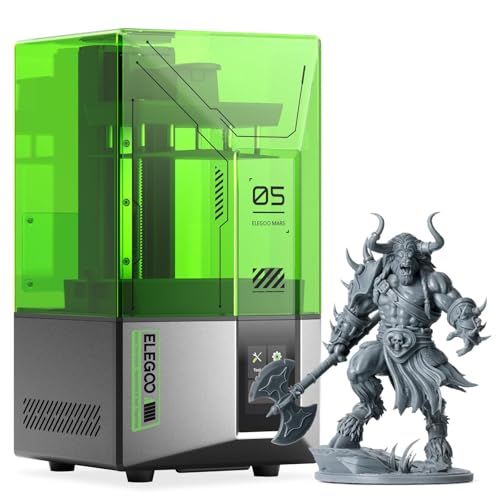 | Detail-Oriented | Display Size: 4.3-inch LCD | Resolution: 4K (3840×2160) | Build Volume: 5.65 x 3.53 x 5.91 inches | VIEW LATEST PRICE | Read Our Analysis |
| ANYCUBIC 10K Resin 3D Printer with 7-inch Screen |  | Ultra-High Resolution | Display Size: 7-inch LCD | Resolution: 10K (9024×5120) | Build Volume: 6.1 x 3.0 x 3.0 inches | VIEW LATEST PRICE | Read Our Analysis |
| ELEGOO Mars 5 Ultra 9K MSLA Resin 3D Printer |  | Max Detail Output | Display Size: 7-inch LCD | Resolution: 9K (8520×4320) | Build Volume: 6.04 x 3.06 x 6.49 inches | VIEW LATEST PRICE | Read Our Analysis |
| ELEGOO Jupiter 2 Resin 3D Printer with Wi-Fi |  | Large-Scale Capability | Display Size: 16K LCD | Resolution: 16K (15120×6230) | Build Volume: 302.4 x 161.98 x 300 mm | VIEW LATEST PRICE | Read Our Analysis |
| ANYCUBIC Photon Mono 4 Resin 3D Printer |  | Compact Power | Display Size: 7-inch LCD | Resolution: 10K (9024×5120) | Build Volume: 6.04 x 3.42 x 6.49 inches | VIEW LATEST PRICE | Read Our Analysis |
More Details on Our Top Picks
Creality HALOT R6 Resin 3D Printer with LCD
If you’re after a resin 3D printer that combines user-friendly simplicity with professional-quality results, the Creality HALOT R6 is a fantastic choice. Designed for beginners and kids alike, it arrives fully assembled—no tools needed! Its compact size, just 16 by 15.4 by 18.7 inches, makes it easy to hide away or place anywhere on your desk. The intuitive guidance system takes care of networking and setup, so you can jump right in. Plus, its lightweight build, thanks to a strong alloy shell, means it’s durable without being cumbersome. It’s perfect for anyone wanting high-quality prints without the headache of complicated machinery.
- Display Size:6.08-inch LCD
- Resolution:2K (2560×1440)
- Build Volume:~4.72 x 2.68 x 6.3 inches
- Speed:Moderate
- Connectivity:USB, optional Wi-Fi
- Additional Features:Automated guidance, remote monitoring
- Additional Feature:Compact mini body design
- Additional Feature:One-click slicing software
- Additional Feature:Optional webcam remote monitoring
ANYCUBIC Photon Mono M7 PRO 3D Resin Printer
Looking for a resin 3D printer that combines high-speed precision with advanced tech? The ANYCUBIC Photon Mono M7 PRO is a great choice. It boasts a 10.1-inch monochrome LCD with an eye-watering 14K resolution (13,312 x 5,120 pixels), letting you print fine details with XY resolution of 16.8 x 24.8 microns. It can reach speeds of 170mm per hour with high-speed resin — faster than many rivals. Its COB LighTurbo 3.0 light source system guarantees even, bright exposure, while features like auto-fill resin and intelligent detection make printing smoother and more reliable. A tool for creators who demand both speed and precision!
- Display Size:10.1-inch LCD
- Resolution:14K (5120×13000)
- Build Volume:8.77 x 4.96 x 9.05 inches
- Speed:Fast (up to 170 mm/h)
- Connectivity:Wi-Fi, Ethernet
- Additional Features:Resin auto-fill, detection systems
- Additional Feature:Fast resin auto-fill
- Additional Feature:Intelligent detection systems
- Additional Feature:Support installment payments
ELEGOO Mars 5 Resin 3D Printer with 4K LCD
The ELEGOO Mars 5 Resin 3D Printer is perfect if you want high detail and precision in your prints, thanks to its 4K LCD screen. This means you get sharp textures and intricate features, ideal for miniatures or detailed prototypes. The printer’s automatic one-click leveling saves you time and effort, supporting quick setups even if you’re new. Plus, it has smart sensors to detect residue, protecting the LCD. Safety remains a priority with overheating protection and a cooling system that keeps the printer running smoothly. Compact and lightweight, it measures about 15.75 by 18.5 inches and weighs just over 14 pounds, making it desktop-friendly and easy to move around.
- Display Size:4.3-inch LCD
- Resolution:4K (3840×2160)
- Build Volume:5.65 x 3.53 x 5.91 inches
- Speed:Moderate (~2-3 seconds per layer)
- Connectivity:USB, optional Wi-Fi
- Additional Features:Automatic leveling, self-check
- Additional Feature:Automatic leveling feature
- Additional Feature:Self-check system
- Additional Feature:Compact desktop size
ANYCUBIC 10K Resin 3D Printer with 7-inch Screen
If you’re after ultra-high resolution prints, the ANYCUBIC 10K Resin 3D Printer with a 7-inch screen is a game-changer. You’ll enjoy a whopping 9024×5120 resolution, giving your models incredible detail and sharpness. The 17×17 micrometer XY pixel means finer surface finishes and complex features come out beautifully. Its built-in LighTurbo matrix light source provides even, stable illumination, cutting exposure times to just 1.5 seconds per layer. Plus, the large build volume and re-engineered platform make handling bigger, demanding projects easier. It’s user-friendly, with quick setup, plus features like resume printing, making it ideal whether you’re a beginner or a seasoned pro.
- Display Size:7-inch LCD
- Resolution:10K (9024×5120)
- Build Volume:6.1 x 3.0 x 3.0 inches
- Speed:Very fast (up to 150mm/h)
- Connectivity:USB, Wi-Fi
- Additional Features:Wi-Fi cluster, remote control
- Additional Feature:6.04” large printing volume
- Additional Feature:WiFi cluster printing
- Additional Feature:Re-engineered build platform
ELEGOO Mars 5 Ultra 9K MSLA Resin 3D Printer
For those who crave max detail output, the ELEGOO Mars 5 Ultra 9K MSLA Resin 3D Printer is a smart choice. With a large build volume of 6.04 × 3.06 × 6.49 inches, it’s perfect for both small miniatures and bigger projects. Its 7-inch monochrome LCD screen offers stunning 8520×4320 resolution, delivering incredibly sharp, highly detailed models. The internal COB light source provides 92% light uniformity, ensuring precision throughout. Plus, with ultra-fast printing speeds up to 150mm/h, and intelligent calibration features, it’s efficient and user-friendly. WiFi connectivity means you can operate remotely, and the AI camera tracks progress, making it a formidable tool for creative minds.
- Display Size:7-inch LCD
- Resolution:9K (8520×4320)
- Build Volume:6.04 x 3.06 x 6.49 inches
- Speed:Ultra-fast (up to 150 mm/h)
- Connectivity:Wi-Fi, USB
- Additional Features:AI camera, real-time monitoring
- Additional Feature:Tilt release innovation
- Additional Feature:Real-time AI monitoring
- Additional Feature:Tempered glass protection
ELEGOO Jupiter 2 Resin 3D Printer with Wi-Fi
Looking to print large, detailed models without breaking a sweat? The ELEGOO Jupiter 2 Resin 3D Printer with Wi-Fi is your go-to for serious projects. Its massive build volume of 302.4 by 161.98 by 300 mm helps you create big or multiple smaller pieces at once. The 16K resolution and ultra-fine XY of 20 by 26 micrometers mean sharp, lifelike details. Plus, with features like auto-leveling, quick resin preheat, and smart resin feeding, setup is easy, and prints stay consistent. The 4-inch touchscreen makes controls simple, and Wi-Fi connectivity lets you monitor and update remotely. It’s a reliable, feature-rich machine perfect for pushing your creative limits.
- Display Size:16K LCD
- Resolution:16K (15120×6230)
- Build Volume:302.4 x 161.98 x 300 mm
- Speed:Moderate to Fast (supports fast features)
- Connectivity:Wi-Fi, Ethernet, USB
- Additional Features:Auto-leveling, smart sensors
- Additional Feature:Large build capacity
- Additional Feature:Automatic resin feeding
- Additional Feature:Dual-band Wi-Fi support
ANYCUBIC Photon Mono 4 Resin 3D Printer
The ANYCUBIC Photon Mono 4 packs a punch in a compact form, making it perfect for those who want high-quality resin prints without taking up much space. Its 7-inch 10K mono LCD screen delivers stunning detail with a resolution of 9024×5120 pixels, sharpening every tiny feature. With a build volume of roughly 6.04 by 3.42 by 6.49 inches, you can create intricate models comfortably. Plus, the LighTurbo matrix light source guarantees even, stable lighting, reducing layer lines and artifacts. The laser-engraved print platform, combined with a simple four-point leveling system, makes setup straightforward—even for beginners!
- Display Size:7-inch LCD
- Resolution:10K (9024×5120)
- Build Volume:6.04 x 3.42 x 6.49 inches
- Speed:Fast (~70 mm/h)
- Connectivity:Wi-Fi, USB
- Additional Features:OTA updates, automatic calibration
- Additional Feature:Laser-engraved platform 2.0
- Additional Feature:4-point leveling system
- Additional Feature:Power outage resume
Factors to Consider When Choosing a 3D Printer With Resin
When choosing a resin 3D printer, you should consider things like printing resolution, which impacts how detailed your models will look, and print volume capacity, especially if you’re aiming for bigger projects. Ease of calibration makes setup smoother, and compatibility with different resin types guarantees you can use your preferred materials without headaches. Also, don’t forget to check out user interface features—they can make or break your overall experience, making your printing journey much more enjoyable.
Printing Resolution Quality
Achieving great resin print quality isn’t just about the resin itself; it’s also about choosing a printer that excels in resolution. Higher resolution LCD screens, like 4K or 10K, make your models look incredibly detailed with smoother surfaces. The XY resolution, measured in micrometers, dictates how fine your details are—smaller numbers mean more precision. Monochrome LCDs are a game-changer because they speed up exposure times, letting you churn out higher-quality prints faster. Plus, advanced light sources like COB or matrix LEDs offer more even and precise illumination, boosting resolution quality. And don’t forget a textured build platform—this little detail helps keep your prints sticking during curing, reducing layer flaws. All these factors together elevate your resin printing game!
Print Volume Capacity
Ever wonder how much room you really need for your resin printing projects? It all depends on what you plan to create. If you’re into big models or want to print several smaller parts at once, look for a printer with a larger print volume. It’s typically measured in width, depth, and height—so pay attention to these dimensions to match your project size. But remember, smaller volumes often mean higher detail and faster print times, which is great for miniatures. Some printers even feature adjustable build plates or modular designs, giving you extra versatility within their volume limits. Keep your project scope in mind, and choose a setup that balances size and detail. After all, printing what you need without unnecessary space is always a smart move!
Ease of Calibration
Getting your resin 3D printer set up correctly can mean the difference between a perfect print and a failed one, so ease of calibration shouldn’t be overlooked. Luckily, many advanced printers feature automatic calibration tools—one-click leveling or sensors that detect residue, making setup smoother. Self-checking systems verify components before printing, saving time and frustration. Consistent calibration processes translate directly into higher print accuracy and better layer adhesion, leading to fewer failed prints. Guides and intuitive interfaces make manual adjustments easier, especially if you’re new to resin printing. Reliable calibration mechanics cut down on constant realignment, so you spend less time fiddling and more time creating. The bottom line? Look for a printer that streamlines calibration, and you’ll get better results with much less hassle.
Compatibility With Resin Types
Have you ever wondered if your resin 3D printer can handle different types of resins? Compatibility is key for smooth projects. Check your printer’s guidelines to see if it supports standard, fast, or specialty resins like UV-sensitive, flexible, or high-temp formulations. Not all printers work with every resin type, and using the wrong one can lead to poor adhesion, warping, or even damage the LCD or light source. For versatility, look for printers designed to support a broad range of resins—great if you’re switching materials often. Always verify if the curing light and exposure settings match your resin’s needs. Knowing these details helps you avoid frustrating surprises and *guarantee* your prints turn out just right.
User Interface Features
Wondering how much the user interface can make or break your resin 3D printing experience? Trust me, it’s a game changer. A good touchscreen you can easily navigate saves time and cuts frustration. Intuitive menus make setup a breeze, especially for beginners. Built-in calibration and automatic leveling mean fewer manual tweaks and more printing fun—no more messing with tricky alignments. Real-time monitoring tools like integrated cameras let you check your print from your couch or while grabbing a coffee, keeping you in the loop. Support for file transfer methods like USB, Wi-Fi, or Ethernet keeps things flowing smoothly. Plus, visual interfaces that are clear and user-friendly, along with instant troubleshooting guides, help you catch issues early and keep your creative mojo alive.
Maintenance and Durability
Choosing a resin 3D printer that’s built to last means paying close attention to its maintenance needs and overall durability. Look for a sturdy build with a high-strength alloy shell—this helps it withstand bumps and regular use. Regular upkeep is key: clean the resin vat often, and replace parts like the FEP film before printing issues pop up. Automated features such as self-checks and residue detection are a bonus because they prevent damage and cut down on costly repairs. A solid cooling system and overheat protection keep your printer running smoothly during long sessions, extending its lifespan. And don’t overlook the frame quality; a vibration-resistant, stable structure keeps prints precise, ensuring your investment lasts for many creative projects to come.
Connectivity Options
Ever wonder how you’ll transfer those intricate design files to your resin 3D printer efficiently? The key is choosing a printer with solid connectivity options. Wireless Wi-Fi lets you upload files from your phone or laptop without tangled cords, and it’s perfect for remote management. But if your Wi-Fi’s shaky, a USB port is your best friend — reliable and straightforward for direct transfers. Some printers even support cloud-based management or mobile apps, so you can update and monitor your printer from anywhere, whether a cozy sofa or a coffee shop. Keep in mind, a stable network connection is essential for advanced features like firmware updates or cluster printing. So, check the stability and speed of your connectivity options before you commit.
Price and Budget
When it comes to resin 3D printers, your budget plays a big role in shaping your options. Prices can range from a few hundred dollars for basic models to over a thousand for high-end machines. Setting a clear budget upfront helps you focus on features like print volume, resolution, and speed that matter most. Cheaper options might lack perks like automatic leveling or Wi-Fi, which can make your life easier but add to the cost. On the flip side, pricier models often boast better technical specs, faster prints, and longer durability, which may justify the investment. Balance your expected usage and needed quality to avoid overpaying for features you won’t use. Remember, a smart budget helps you get the best print quality without breaking the bank!