When setting up your 3D printing space, choosing the right ventilation system can make all the difference. From simple kits that handle small fumes to advanced filters that keep odors at bay, there’s a solution for every setup. Think about airflow capacity, noise levels, and ease of installation. The right system will not only improve air quality but also keep your workspace safe and more comfortable—because who wants fumes lingering around? Still, with so many options out there, knowing which one suits your needs is just the start.
| Baquler 3D Printer Fume Extraction Kit with Fan | 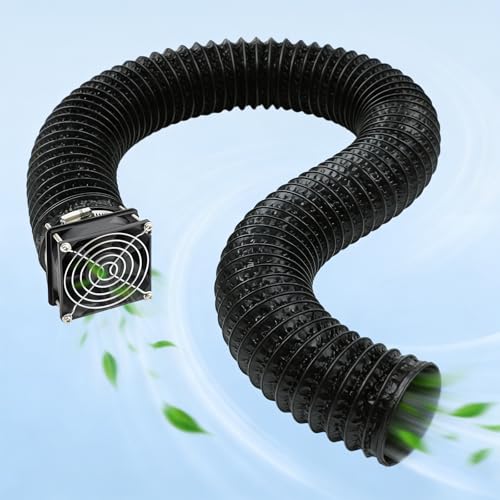 | Best All-In-One | Fan Speed: 4000 RPM | Pipe Length: Up to 2 meters | Filtration: None (just fume extraction) | VIEW LATEST PRICE | Read Our Analysis |
| UniTak3D Smoke Exhaust Kit for Laser & 3D Printer | Quiet Efficiency | Fan Speed: 4500 RPM | Pipe Length: Not specified | Filtration: Flame-retardant pipe, filter optional | VIEW LATEST PRICE | Read Our Analysis | |
| TOPCUBE Adjustable 3D Printer Ventilation Kit |  | Flexible & Easy | Fan Speed: 80.6 CFM airflow (equivalent to high RPM) | Pipe Length: Up to 2 meters | Filtration: Activated carbon filter, optional | VIEW LATEST PRICE | Read Our Analysis |
| 3-Layer Smoke Exhaust Kit with Fan and Speed Control | Heavy-Duty Filtration | Fan Speed: Up to 5000 RPM | Pipe Length: Not specified | Filtration: Three-layer filter system (large particles & gases) | VIEW LATEST PRICE | Read Our Analysis | |
| Smart Control 3-Layer Ventilation Filter Kit for 3D Printer |  | Versatile & Adjustable | Fan Speed: 5000 RPM | Pipe Length: Not specified | Filtration: 3-layer filtration (large particles & gases) | VIEW LATEST PRICE | Read Our Analysis |
More Details on Our Top Picks
Baquler 3D Printer Fume Extraction Kit with Fan
If you’re looking for a straightforward, all-in-one solution to improve your 3D printer’s air quality, the Baquler Fume Extraction Kit with Fan fits the bill. It comes with everything you need for quick installation — a mesh cover, a high-efficiency 4000 RPM fan, exhaust pipe, flange, clips, and screws. This setup actively pulls away fumes, odors, smoke, and tiny dust particles during printing. Plus, with an adjustable exhaust pipe up to 2 meters long, you can customize how and where you direct airflow for your space. It’s compact, easy to install on compatible enclosures, and keeps your workspace cleaner and safer.
- Fan Speed:4000 RPM
- Pipe Length:Up to 2 meters
- Filtration:None (just fume extraction)
- Mounting Mechanism:Mesh cover, screws, clips
- Power Connection Type:3-pin connector
- Noise Level:Not specified
- Additional Feature:Expandable up to 2 meters pipe
- Additional Feature:All-in-one installation kit
- Additional Feature:3-pin power connector
UniTak3D Smoke Exhaust Kit for Laser & 3D Printer
Looking for a ventilation option that offers quiet efficiency during long 3D printing or laser engraving sessions? The UniTak3D Smoke Exhaust Kit might just be your new best friend. It features a powerful 4500RPM fan with an exhaust pipe made from flame-retardant materials, ensuring safety and durability. Designed to fit laser engravers and popular enclosures like the Bambu Lab A1 and A1 Mini, it removes smoke, fumes, and dust effectively. And with its advanced mute technology, it runs whisper-quiet—ideal for home, studio, or office. Installation is straightforward: no need for complex tools or expert help. Just follow the instructions, and you’ll be up and running in no time!
- Fan Speed:4500 RPM
- Pipe Length:Not specified
- Filtration:Flame-retardant pipe, filter optional
- Mounting Mechanism:Magnetic mounting, clips
- Power Connection Type:Not specified, likely standard plug
- Noise Level:Extremely low (mute technology)
- Additional Feature:Flame-retardant exhaust pipe
- Additional Feature:Quiet operation with mute tech
- Additional Feature:Suitable for multiple device types
TOPCUBE Adjustable 3D Printer Ventilation Kit
This ventilator kit is perfect if you want a flexible and easy way to manage fumes from your 3D printer. It features a powerful 80.6 CFM exhaust fan that can be adjusted with a simple switch, so you control airflow based on your needs. The magnetic-mount filter with activated carbon helps cut odors and dust, making your workspace more pleasant. And with a flexible exhaust pipe extending up to 2 meters, setup flexibility is built right in — whether you’ve got a small or large area to ventilate. Quick to install and remove, this kit keeps your environment cleaner and more comfortable, without adding hassle.
- Fan Speed:80.6 CFM airflow (equivalent to high RPM)
- Pipe Length:Up to 2 meters
- Filtration:Activated carbon filter, optional
- Mounting Mechanism:Magnetic mounting, no specific mounting system
- Power Connection Type:Not specified
- Noise Level:Not specified
- Additional Feature:Magnetic-mount filter attachment
- Additional Feature:Adjustable airflow switch
- Additional Feature:Compatible with all TOPCUBE enclosures
3-Layer Smoke Exhaust Kit with Fan and Speed Control
The 3-Layer Smoke Exhaust Kit with Fan and Speed Control offers heavy-duty filtration perfect for those seeking a safer, cleaner printing environment. Designed to fit most laser engraver and 3D printer enclosures, it features a 12V fan with adjustable speed—so you can tailor airflow to your needs. The triple-layer filter captures large dust particles and harmful gases, keeping your workspace healthier. Plus, with a compact size of 4x4x1.6 inches and a weight of just over 14 ounces, it’s easy to install and move around. Use the included power adapter and customize your airflow to match your printing demands—simple, effective, and a real refreshing change!
- Fan Speed:Up to 5000 RPM
- Pipe Length:Not specified
- Filtration:Three-layer filter system (large particles & gases)
- Mounting Mechanism:Customizable enclosure fitting, no specific mounting system
- Power Connection Type:12V DC power supply
- Noise Level:Not specified
- Additional Feature:Includes three-layer filtration
- Additional Feature:Adjustable fan speed via power supply
- Additional Feature:Compatible with enclosure tents
Smart Control 3-Layer Ventilation Filter Kit for 3D Printer
If you want a ventilation solution that’s versatile and adjustable, the Smart Control 3-Layer Ventilation Filter Kit is a great pick. This kit packs a powerful 5000 RPM exhaust fan, a 1.5-meter pipe, and multiple filter layers to trap dust, large particles, and harmful gases. Designed for 3D printer enclosures, laser engravers, or DIY tents, it’s compatible with most setups—though some cutting for installation might be needed. Plus, the adjustable speed lets you customize airflow for different printing environments. Its lightweight design and simple power setup make it easy to install, giving you cleaner, healthier prints every time.
- Fan Speed:5000 RPM
- Pipe Length:Not specified
- Filtration:3-layer filtration (large particles & gases)
- Mounting Mechanism:Magnetic mount, clip-in
- Power Connection Type:12V DC power supply
- Noise Level:Not specified
- Additional Feature:12V brushless DC fan
- Additional Feature:Compatible with most enclosures
- Additional Feature:Comes with plastic adaptor
Factors to Consider When Choosing Ventilation for 3D Printer
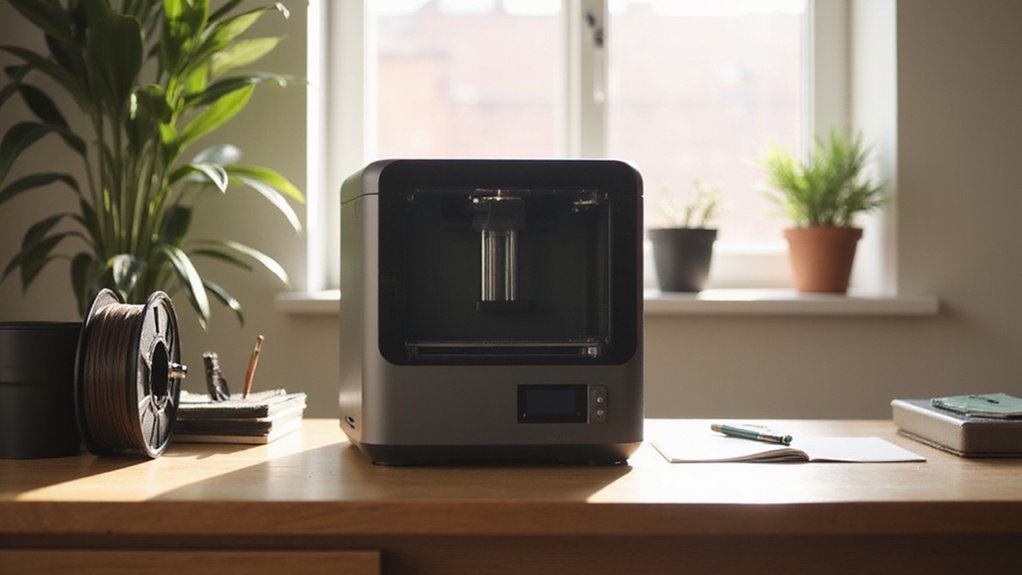
When choosing ventilation for your 3D printer, you need to take into account things like airflow capacity—how much air moves to clear those fumes—and noise levels, especially if your workspace doubles as a living area. Enclosure compatibility and filtration efficiency matter too, since not all setups fit every printer and some filters catch more hazards than others. And don’t forget about installation—some systems are quick and simple to set up, while others might require a bit more patience and patience is a virtue, right?
Airflow Capacity Needs
Choosing the right airflow capacity for your 3D printer ventilation isn’t just about grabbing the highest CFM number you see; it’s about matching the system to your specific setup and materials. For smaller printers or enclosures, a lower CFM rating—around 10 to 30—is usually enough since fumes are minimal. Larger setups, however, produce more fumes and dust, so you’ll want above 50 CFM to keep the air fresh and safe. Remember, the fumes, smoke, and dust depend on your filament type, so a system with adjustable airflow is a smart choice; it lets you fine-tune strength without losing control over noise. Always aim for a system that matches or exceeds your fumes output—your lungs and workspace will thank you!
Noise Level Preferences
Balancing airflow capacity with noise levels is a key part of setting up an effective ventilation system for your 3D printer. You want airflow powerful enough to clear fumes but not so loud it turns your workspace into a noisy chaos. Fans with advanced mute technology can keep noise below 40 decibels—about the volume of a whisper—making them perfect for home offices or shared spaces. Adjustable speed settings are also a game-changer; dial down the fan when full power isn’t needed to cut the racket. Consider the fan’s design and enclosure, especially noise-dampening materials that minimize sound. Remember, quieter options make a huge difference if you work in sensitive environments, keeping your sanity intact during those long printing sessions!
Enclosure Compatibility Tips
Getting your ventilation system to fit snugly with your 3D printer’s enclosure isn’t just about size—it’s about making sure everything works together smoothly. First, confirm your system matches the enclosure’s dimensions to allow secure attachment and efficient fume extraction. Check if your enclosure has dedicated openings or ports for exhaust pipes or fans—if not, you might need to do some custom modifications. Consider the airflow capacity; it should be enough to exchange air quickly given your enclosure’s volume. Also, make sure all components can be mounted securely without blocking access or movement of the printer. And finally, look at your enclosure’s material and design—can it handle filter attachments, exhaust ports, or magnetic mounts? A well-matched setup means safer, cleaner printing every time!
Filtration Efficiency Options
When it comes to keeping the air around your 3D printer clean, filtration efficiency really makes a difference. The key is in the layers—think activated carbon to absorb odors, HEPA filters to trap fine particles, and sometimes both combined for broader protection. Multi-layer systems are great because they catch a wider range of fumes, dust, and gases, making your workspace healthier. But remember, denser filters can slow airflow, so there’s a balance to strike. High-quality materials with small pore sizes do a better job at absorbing odors and fumes, helping you breathe easier. To keep filtration working its best, regular maintenance and filter replacements are essential. Neglecting this can turn your filter into a filter of doom—full of contaminants instead of blocking them!
Installation Complexity
Choosing the right ventilation system for your 3D printer can feel like steering through a maze of options, but understanding the installation complexity can make your decision much easier. Some systems need a professional’s touch, involving drilling or modifications to your enclosure, which could be tricky if you’re not handy. Others are designed for quick setups, featuring simple attachment points, modular components, and clear instructions.
Look for products that offer:
- Easy-to-install parts with straightforward attachment and removal
- Compatible designs that fit various printer models and spaces
- Manufacturer instructions with step-by-step guidance
Evaluating these aspects helps you avoid headaches, saves time, and guarantees your setup is safe and effective. Remember, complexity doesn’t always mean better—simplicity often wins the day!
Durability and Material Quality
Focusing on durability and material quality can make a big difference in how well your ventilation system performs over time. When choosing components, look for high-quality, flame-retardant, and corrosion-resistant materials. These qualities guarantee your system withstands high temperatures and prolonged use without degrading. Flexible, shockproof parts add durability by resisting vibrations and physical stress, keeping your setup stable. Think of high-grade plastics, metals, or composite materials as your system’s armor—minimizing deformations and breakdowns that could compromise performance. Plus, materials that are fire-retardant help prevent accidents, giving you peace of mind during those long, intense printing sessions. Remember, investing in strong, quality components means fewer replacements and repairs, making your ventilation system more reliable and long-lasting.
Safety and Flame Resistance
Ever wonder why safety should be front and center when setting up your 3D printer ventilation system? It’s all about preventing fires and keeping your workspace safe. Using flame-retardant materials in pipes, fittings, fans, and filters is essential—these components resist ignition even at high temperatures or if sparks fly during printing. Make sure your exhaust system meets proper fire safety standards, so it can handle the heat without catching fire. Regularly inspect your setup for damage or wear, because even tiny cracks or corrosion can become fire hazards. The goal is to reduce risks, protect your equipment, and keep your environment safe. Remember, safety’s not just a checkbox; it’s your first line of defense against fire.