If you’re thinking about diving into laser engraving, you’re in luck. There are top options designed specifically for hobbyists like you—compact, powerful, and easy to use. Whether you want precise details on wood and leather or handle thicker materials like metal, there’s a machine suited for your projects. From portable devices to high-performance engravers, these seven choices offer something for everyone. But which one fits your style and needs? Keep going to find out.
| ACMER S1 Laser Engraver with 130x130mm Area |  | Compact & Accurate | Power Output: 2500mW diode laser, 24W output | Compatibility: Supports AcmerTool, LightBurn, LaserGRBL (macOS, Windows, Linux) | Software Control: Custom AcmerTool, LightBurn, LaserGRBL | VIEW LATEST PRICE | Read Our Analysis |
| CREALITY Falcon 10W Laser Engraver & Cutter |  | Versatile & Precise | Power Output: 10,000mW (10W) laser | Compatibility: Supports LaserGRBL, LightBurn (Windows, macOS) | Software Control: LaserGRBL, LightBurn | VIEW LATEST PRICE | Read Our Analysis |
| BlazeX M3 10W Laser Engraver for Wood Metal Glass |  | Professional-Level | Power Output: 10W laser | Compatibility: Compatible with LightBurn, LaserGRBL, CutLabX (Windows, macOS, iOS, Android) | Software Control: LightBurn, LaserGRBL, CutLabX | VIEW LATEST PRICE | Read Our Analysis |
| LaserPecker LP1 Plus Mini Laser Engraver for Beginners | Portable & User-Friendly | Power Output: Not specified (mini laser) but portable power | Compatibility: LaserPecker App (Design Space App) | Software Control: LaserPecker Design Space App | VIEW LATEST PRICE | Read Our Analysis | |
| WECREAT Vista 10W Laser Engraving Machine with Rotary | 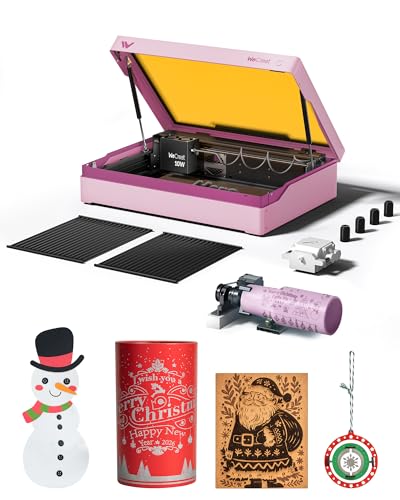 | All-in-One Power | Power Output: 10W laser | Compatibility: Supports LightBurn, proprietary software for design | Software Control: Proprietary software, LightBurn | VIEW LATEST PRICE | Read Our Analysis |
| K15 Pro Laser Engraver Machine for Wood & Metal |  | Upgradeable & Reliable | Power Output: 5.5W (5500mW) diode laser | Compatibility: Compatible with LaserGRBL, LightBurn | Software Control: LaserGRBL, LightBurn | VIEW LATEST PRICE | Read Our Analysis |
| Twotrees TTS-55 Pro Laser Engraver and Cutter |  | High-Speed Precision | Power Output: 5.5W (approximate based on 5500mW) laser | Compatibility: Supports LaserGRBL, LightBurn, web/Wi-Fi control | Software Control: LaserGRBL, LightBurn, web browser/Wi-Fi | VIEW LATEST PRICE | Read Our Analysis |
More Details on Our Top Picks
ACMER S1 Laser Engraver with 130x130mm Area
If you’re looking for a compact and accurate laser engraver perfect for hobbyists, the ACMER S1 stands out with its generous 130x130mm working area. This means you get enough space to craft detailed designs without feeling cramped. Its 2500mW diode laser offers ultra-fine accuracy, making intricate engravings on wood, leather, or plastic a breeze. Plus, it’s super user-friendly — arriving 99% preassembled and requiring just a minute to install the laser head. Its lightweight, durable aluminum design fits neatly on your workbench, giving you professional precision in a small package. Whether a beginner or pro, you’ll appreciate its versatility and ease of use.
- Power Output:2500mW diode laser, 24W output
- Compatibility:Supports AcmerTool, LightBurn, LaserGRBL (macOS, Windows, Linux)
- Software Control:Custom AcmerTool, LightBurn, LaserGRBL
- Materials Supported:Wood, bamboo, leather, plastic, PCB, ceramics
- Size / Working Area:130x130mm
- Portability:Compact, lightweight (3.98 lbs), portable
- Additional Feature:Self-developed AcmerTool software
- Additional Feature:Compact, lightweight design
- Additional Feature:Supports multiple file formats
CREALITY Falcon 10W Laser Engraver & Cutter
The Creality Falcon 10W laser engraver and cutter is your go-to if you want a versatile and precise tool that handles a variety of materials effortlessly. With 10,000mW power, it can cut through 12mm wood or 3mm black acrylic in just one pass. The laser spot size of 0.06mm ensures detailed work with an accuracy around 0.004 inches. Easy to assemble in 10-20 minutes, it supports software like LaserGRBL and LightBurn for user-friendly operation. Plus, its safety features, including an emergency stop, make it a smart choice. The 4-in-1 rotary roller system adds even more creative possibilities, allowing for cylindrical, spherical, or ring-shaped engraving.
- Power Output:10,000mW (10W) laser
- Compatibility:Supports LaserGRBL, LightBurn (Windows, macOS)
- Software Control:LaserGRBL, LightBurn
- Materials Supported:Wood, metal, acrylic, paper, plastic, glass
- Size / Working Area:Approx. 170x230mm
- Portability:Portable, weighs 20.1 lbs
- Additional Feature:Rotary roller system included
- Additional Feature:Adjustable airflow air pump
- Additional Feature:Offline operation via TF card
BlazeX M3 10W Laser Engraver for Wood Metal Glass
Looking for a laser engraver that brings professional-level precision into your home studio? The BlazeX M3 10W is a sleek, powerful machine perfect for crafting detailed designs on wood, metal, and glass. Its ultra-fine 0.01mm accuracy makes intricate engraving easy, whether you’re personalizing jewelry or creating complex patterns on coated metals. This all-in-one device combines cutting and engraving functions, with a robust starter kit that includes safety gear, a honeycomb bed, and materials. Designed for safety and ease of use, it features smart sensors and quiet operation. Compatible with popular software, it’s everything you need to turn your creative ideas into reality—right at your workspace!
- Power Output:10W laser
- Compatibility:Compatible with LightBurn, LaserGRBL, CutLabX (Windows, macOS, iOS, Android)
- Software Control:LightBurn, LaserGRBL, CutLabX
- Materials Supported:Wood, leather, glass, coated metals
- Size / Working Area:Approx. 255x255mm
- Portability:Desktop, portable but not lightweight
- Additional Feature:Protective enclosure included
- Additional Feature:Portable desktop design
- Additional Feature:2-in-1 cutter and engraver
LaserPecker LP1 Plus Mini Laser Engraver for Beginners
Ever wish you could turn your creative ideas into personalized crafts on the go? The LaserPecker LP1 Plus Mini Laser Engraver is perfect for that. It’s a pocket-sized device weighing just 2.38 pounds, making it super portable. With an upgraded adjustable stand and a 360° multi-angle joint, you can engrave on flat, curved, even awkward surfaces like bottles or notebooks. Plus, setup is lightning-fast — less than 2 minutes — and no calibration needed. Just connect to a power bank, choose your material, and import your design via the user-friendly app. It’s ideal for DIY projects, gifts, or small business ventures whenever inspiration strikes.
- Power Output:Not specified (mini laser) but portable power
- Compatibility:LaserPecker App (Design Space App)
- Software Control:LaserPecker Design Space App
- Materials Supported:Wood, leather, acrylic, paper, fruit, felt
- Size / Working Area:7.3×6.9×4.1 inches (compact, portable)
- Portability:Pocket-sized, highly portable (2.38 lbs)
- Additional Feature:Pocket-sized, portable design
- Additional Feature:Multi-angle joint for surfaces
- Additional Feature:Engraves on curved surfaces
WECREAT Vista 10W Laser Engraving Machine with Rotary
If you’re after an all-in-one power tool that makes engraving easier and more precise, the WECREAT Vista 10W Laser Engraving Machine with Rotary is a fantastic choice for hobbyists. Its compact, desktop design packs a punch with a 16.34×11.42-inch work area and speeds up to 600mm/s. The laser spot size of 0.06 by 0.04mm guarantees fine detail, perfect for fabric, acrylic, or even metals with the optional 2W infrared module. Features like the smart HD TopView camera and the 90° FlipLaser rotary make aligning and engraving on cylinders effortless. Plus, safety takes priority with an enclosed design and effective fume extraction.
- Power Output:10W laser
- Compatibility:Supports LightBurn, proprietary software for design
- Software Control:Proprietary software, LightBurn
- Materials Supported:Wood, acrylic, coated metal, fabric
- Size / Working Area:16.34×11.42 inches (large desktop)
- Portability:Desktop, moderate portability
- Additional Feature:HD TopView camera
- Additional Feature:Patented 90° FlipLaser rotary
- Additional Feature:Fume Extractor CleanAir system
K15 Pro Laser Engraver Machine for Wood & Metal
The K15 Pro Laser Engraver Machine is a solid choice for hobbyists who want an upgradeable and reliable tool to bring their creative ideas to life. With a compact size and an A4 work area, it fits comfortably on your desk, yet supports larger projects thanks to four detachable heightening columns for taller items. Its true 10W laser power delivers precise engraving and cutting on over 100 materials, from wood to coated metal. Plus, with wireless connectivity, an AI design tool, and quick assembly, you’ll be up and running in no time. And if you crave more, upgrading with a fiber laser module is a breeze!
- Power Output:5.5W (5500mW) diode laser
- Compatibility:Compatible with LaserGRBL, LightBurn
- Software Control:LaserGRBL, LightBurn
- Materials Supported:Wood, acrylic, coated metals, leather
- Size / Working Area:7.9×11.8 inches
- Portability:Desktop, portable
- Additional Feature:Detachable heightening columns
- Additional Feature:Wireless and wired control
- Additional Feature:Modular upgrade options
Twotrees TTS-55 Pro Laser Engraver and Cutter
Looking for a laser engraver that combines high-speed precision with versatility? The Twotrees TTS-55 Pro is the one to contemplate. With a 5500mW laser and a 300 x 300 mm work area, it handles everything from wood and leather to stainless steel and glass. Thanks to its compression laser tech and upgraded air-assisted nozzle, you get sharper details and deeper cuts with a focus down to 0.08mm. It supports speeds up to 30,000mm/min—fast enough to keep up with your creative flow. Plus, Wi-Fi control and software compatibility with LaserGRBL and LightBurn make it user-friendly for hobbyists and pros alike.
- Power Output:5.5W (approximate based on 5500mW) laser
- Compatibility:Supports LaserGRBL, LightBurn, web/Wi-Fi control
- Software Control:LaserGRBL, LightBurn, web browser/Wi-Fi
- Materials Supported:Wood, leather, acrylic, glass, metal
- Size / Working Area:300x300mm
- Portability:Desktop size, relatively compact in its class
- Additional Feature:Compression laser technology
- Additional Feature:Highly accurate 0.1mm engraving
- Additional Feature:Support for Wi-Fi-controlled engraving
Factors to Consider When Choosing Laser Engraver for Hobbyist
When choosing a laser engraver for your hobby projects, you’ll want to think about several key factors to find the best fit. Things like your budget, what materials you plan to work on, and how easy the machine is to operate can make a big difference in your experience. And don’t forget about safety standards, size, and whether the device is portable — these details guarantee you get a tool that suits your space and lifestyle perfectly!
Budget and Cost
Budget plays a big role when choosing a laser engraver for your hobby projects, so it’s important to set a realistic number from the start. Determine what you’re willing to spend and stick to it, but remember, a higher price often means better power and features. Look at the true power output — higher wattage usually means it can cut through thicker materials faster. Balance the initial cost with ongoing expenses like spare parts, maintenance, and software updates. Also, consider features such as safety certifications and included accessories. These extras might bump up the price, but they make your experience safer and more convenient. Keep a clear picture of your needs versus your budget, and you’ll find the right engraver without overspending.
Material Compatibility
Choosing a laser engraver that truly matches your hobby needs starts with understanding what materials you plan to work with most. You’ll want a machine that supports engraving on your favorite substances—be it wood, leather, plastic, or even metal. Check the maximum thickness it can handle; for example, 12mm for plywood or 3mm for acrylic—this keeps your projects feasible. For detailed work on coated metals or glass, verify it’s compatible with high-precision tasks. Make sure the laser’s wavelength and power settings suit your materials, especially for metal or glass, which often demand specialized configurations. And always double-check that your chosen engraver can handle the materials safely and effectively, avoiding damage or subpar results. After all, you want your creative visions to come to life, not get stuck in a technical quagmire!
Ease of Use
Getting started with a laser engraver is usually the fun part, but the real charm lies in how easy it is to operate. If the machine has a user-friendly interface, you’ll spend less time figuring out controls and more time making art. Simplified software like LightBurn or LaserGRBL means you don’t need to learn a whole new language—basic commands work perfectly. Compact, lightweight designs make it easy to move your setup around, fitting into small spaces without fuss. Plus, clear safety features and minimal calibration make operation stress-free. And if it’s preassembled or needs little setup, you’re good to go in no time. The easier it is to use, the sooner you’ll be creating amazing projects with confidence!
Safety Standards
Ensuring your safety while working with a laser engraver isn’t something to take lightly. First, look for models with proper safety certifications like Class 1 or Class 4, which guarantee they’re built with safety standards in mind. Features like emergency stop buttons, safety covers, and automatic shutoff mechanisms are must-haves—they’re your first line of defense. And don’t forget to verify the device’s compliance with international safety regulations like IEC 60825-1. Some engravers even have sensors that halt operation if the lid opens or the machine tilts—adding peace of mind. Check for adequate protective enclosures and filters to block harmful laser radiation and fumes. Good safety features keep your hobby safe, letting you focus on creating without worry.
Size and Portability
When selecting a laser engraver, size and portability are key factors that can make or break your hobby experience. You want something that fits comfortably in your space and matches your project needs. Compact, lightweight models—often under 10 pounds—are perfect for quick setup and easy transport, whether you’re working in your garage or outdoor space. These models are great for beginners or hobbyists with limited room since they’re easy to store when not in use. Big engravers, with larger working areas, are ideal if you’re tackling bigger projects regularly but require dedicated space and aren’t as portable. Overall, think about your workspace and whether moving your engraver around sounds like a hassle or a breeze.
Software Support
Choosing a laser engraver that works smoothly with your preferred software can make a huge difference in your hobby projects. You want compatibility with popular programs like LightBurn, LaserGRBL, or proprietary software that suits your operating system. Look for user-friendly interfaces and features like image import, design editing, and machine control—these save time and frustration. Check if the software supports formats like NC, DXF, BMP, JPG, and PNG—giving you flexible design options. Also, consider offline operation via SD card or USB, so you’re not reliant on constant Wi-Fi or internet. And if you love inspiration, see if your software offers access to a library of templates and community resources. After all, good software support makes your hobby both easier and more enjoyable!
Power and Precision
A laser engraver’s power and precision are like the dynamic duo of cutting and engraving quality—without one, the other can’t reach its full potential. Higher power, typically 10W or more, lets you cut faster and deeper into thick materials, making quick work of projects. Precision is measured by the laser spot size and accuracy—smaller spots, like 0.01mm, give you fine details for intricate designs, perfect for professional-looking results. When choosing, consider:
- The range of materials you want to work with—more power handles metals and plastics.
- The complexity of your designs—higher precision captures finer details.
- The balance—enough power for speed, high enough precision for quality.
Getting both right makes your hobby projects truly stand out!