When it comes to keeping your garage safe and tidy during 3D printing, choosing the right enclosure makes all the difference. You’ll want something durable, easy to assemble, and capable of controlling fumes, dust, and noise—all while fitting your space. From cabinets with filament storage to enclosures with ventilation and even dehumidifiers, there’s a range of options that can simplify your setup and protect your environment. Let’s explore five top choices that might just change how you print at home.
| Crafit 3D Printer Cabinet with Filament Storage | 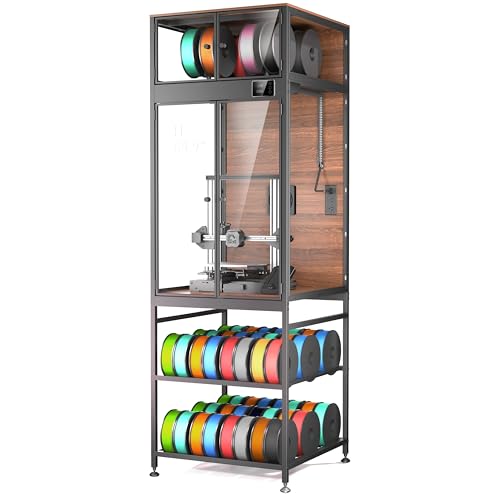 | Premium Organization | Compatibility: Suitable for printers up to 21.6”W x 22”D x 28.7”H; models like Bambu Lab P1S/X1, Creality K1 Max, Ender 3 series | Material: Carbon steel frame with composite walls | Ventilation: Manual high-flow fan, integrated vent control | VIEW LATEST PRICE | Read Our Analysis |
| Multifunctional 3D Printer Enclosure with Ventilation Kit |  | Compact Safety | Compatibility: Fits most LCD/resin printers including Anycubic Photon Mono, Elegoo Saturn/Mars 3/4, Creality Halot series | Material: PU Oxford fabric, aluminum foil, stainless steel pipes | Ventilation: 12V fan with adjustable speed, three-layer filtration | VIEW LATEST PRICE | Read Our Analysis |
| 3D Printer Enclosure with Dehumidifier & Storage Stand |  | All-in-One Climate | Compatibility: Supports Bambu Lab P1S/P2S, Ender 3, Creality K1, ELEGOO, FLASHFORGE Adventurer | Material: Heavy-duty metal frame | Ventilation: Active dehumidifier, dustproof, and odor control | VIEW LATEST PRICE | Read Our Analysis |
| YOOPAI 3D Printer Enclosure Dustproof Cover |  | Easy Installation | Compatibility: Suitable for Ender series (e.g., Ender 3 V3 SE/KE, Ender 3, Ender 3 Pro, V2, S1, Max, 6SE), for Kobra, Mega Pro, Neptune | Material: Fire-resistant fabric, durable with fiberglass rods | Ventilation: External exhaust support, optional fan exhaust | VIEW LATEST PRICE | Read Our Analysis |
| YOOPAI 3D Printer Enclosure with LED Light | LED-lit Safety | Compatibility: Designed for FLASHFORGE AD5X/AD5M, supports printers with dimensions less than approx. 29.5×25.6×21.6 inches | Material: Fire-resistant, durable plastic/cloth | Ventilation: Supports external fan exhaust, ventilation kit optional | VIEW LATEST PRICE | Read Our Analysis |
More Details on Our Top Picks
Crafit 3D Printer Cabinet with Filament Storage
If you’re after premium organization, the Crafit 3D Printer Cabinet with Filament Storage is a smart choice for keeping your workspace tidy and efficient. It fits printers up to 21.6 inches wide, deep, and high—so measure your gear first, just to be safe. The cabinet has an ultra-stable carbon steel frame with rigid composite walls, dampening vibrations and cutting noise up to 40%. It offers high-density storage for 48 filament spools on sturdy rods, plus a top compartment for eight. And with integrated ports for multiple filaments, plus bright LED lighting and a high-flow fan, this cabinet makes 3D printing safer, cleaner, and more organized.
- Compatibility:Suitable for printers up to 21.6”W x 22”D x 28.7”H; models like Bambu Lab P1S/X1, Creality K1 Max, Ender 3 series
- Material:Carbon steel frame with composite walls
- Ventilation:Manual high-flow fan, integrated vent control
- Filament Storage:Holds 48 spools, top compartment for 8 spools
- Monitoring & Lights:Bright LED lighting, PET panels, internal LED spotlight
- Ease of Assembly:Not specified, but detailed support provided
- Additional Feature:Vibration damping system
- Additional Feature:Dustproof interior compartment
- Additional Feature:Climate control vent
Multifunctional 3D Printer Enclosure with Ventilation Kit
Looking for a compact safety solution that keeps your workspace clean and your prints safe? The Multifunctional 3D Printer Enclosure with Ventilation Kit might just be what you need. It fits most LCD and resin 3D printers like the Anycubic Photon Mono and Creality Halot series—just measure first! Made from fire-resistant fabric, it’s designed to keep fumes, dust, and odors at bay, thanks to the three-layer filters and adjustable 12V fan. Inside, there’s a large UV-blocking window for easy monitoring and durable stainless steel pipes for long-term use. Basically, it’s an all-in-one, portable safety shield for your printing adventures.
- Compatibility:Fits most LCD/resin printers including Anycubic Photon Mono, Elegoo Saturn/Mars 3/4, Creality Halot series
- Material:PU Oxford fabric, aluminum foil, stainless steel pipes
- Ventilation:12V fan with adjustable speed, three-layer filtration
- Filament Storage:Not specified
- Monitoring & Lights:Stainless steel pipe light, view window
- Ease of Assembly:Portable, easy to install
- Additional Feature:UV protection window
- Additional Feature:Portable lightweight design
- Additional Feature:Three-layer filtration system
3D Printer Enclosure with Dehumidifier & Storage Stand
This all-in-one climate solution keeps your 3D printers and filament organized and protected in one sturdy enclosure. With 180 liters of space, it supports popular models like the Ender 3, Bambu Lab P1S/P2S, and others, supporting up to 40 filament spools. The active dehumidifier adjusts humidity from 25% to 60%, creating a sealed environment that keeps filaments like PLA and ABS from moisture damage. Heavy-duty metal construction guarantees stability, minimizing vibrations during printing. Plus, with adjustable leveling feet and clear displays for temperature and humidity, setup’s a breeze. It’s a smart, efficient way to safeguard your prints and materials.
- Compatibility:Supports Bambu Lab P1S/P2S, Ender 3, Creality K1, ELEGOO, FLASHFORGE Adventurer
- Material:Heavy-duty metal frame
- Ventilation:Active dehumidifier, dustproof, and odor control
- Filament Storage:Supports up to 40 spools, organized internal storage
- Monitoring & Lights:No built-in lighting mentioned
- Ease of Assembly:Pre-numbered panels, illustrated instructions, quick setup
- Additional Feature:Active humidity control
- Additional Feature:Supports up to 300 lbs.
- Additional Feature:Adjustable leveling feet
YOOPAI 3D Printer Enclosure Dustproof Cover
The YOOPAI 3D Printer Enclosure Dustproof Cover is designed for anyone who wants an easy-to-assemble solution to protect their printer and improve print quality. It supports many printers like Creality Ender models and For Anycubic or ELEGOO options, measuring 29.5 by 25.6 by 21.6 inches—big enough for most setups. The enclosure keeps a steady temperature during printing, reducing failures, clogs, and wasted filament. Plus, it’s dust-proof, noise-reducing, and protects little curious hands. You’ll love how quick it is to set up—about five minutes—and how durable it feels, making it perfect for long-term use.
- Compatibility:Suitable for Ender series (e.g., Ender 3 V3 SE/KE, Ender 3, Ender 3 Pro, V2, S1, Max, 6SE), for Kobra, Mega Pro, Neptune
- Material:Fire-resistant fabric, durable with fiberglass rods
- Ventilation:External exhaust support, optional fan exhaust
- Filament Storage:Not specified
- Monitoring & Lights:No integrated lighting mentioned
- Ease of Assembly:Assembles in about five minutes
- Additional Feature:Quick assembly setup
- Additional Feature:Fire-resistant construction
- Additional Feature:External exhaust compatibility
YOOPAI 3D Printer Enclosure with LED Light
If safety and visibility matter to you, the YOOPAI 3D Printer Enclosure with LED Light is a smart choice. Designed specifically for FLASHFORGE AD5X and AD5M printers, it’s sturdy and quick to install—about five minutes, tops. Plus, it’s easy to disassemble if you need to move or replace it. The enclosure creates a stable environment, reducing print failures caused by temperature fluctuations. The built-in LED light strips brighten your workspace, helping you catch issues early. It also drowns out noise and keeps dust, debris, and curious pets away, all while being fire-resistant and durable—making your 3D printing safer and more efficient.
- Compatibility:Designed for FLASHFORGE AD5X/AD5M, supports printers with dimensions less than approx. 29.5×25.6×21.6 inches
- Material:Fire-resistant, durable plastic/cloth
- Ventilation:Supports external fan exhaust, ventilation kit optional
- Filament Storage:Not specified
- Monitoring & Lights:LED light strip included
- Ease of Assembly:Assembles in about five minutes, quick setup
- Additional Feature:Integrated LED illumination
- Additional Feature:Quiet noise reduction
- Additional Feature:Supports ventilation kit (optional)
Factors to Consider When Choosing a 3D Printer Enclosure for Garage
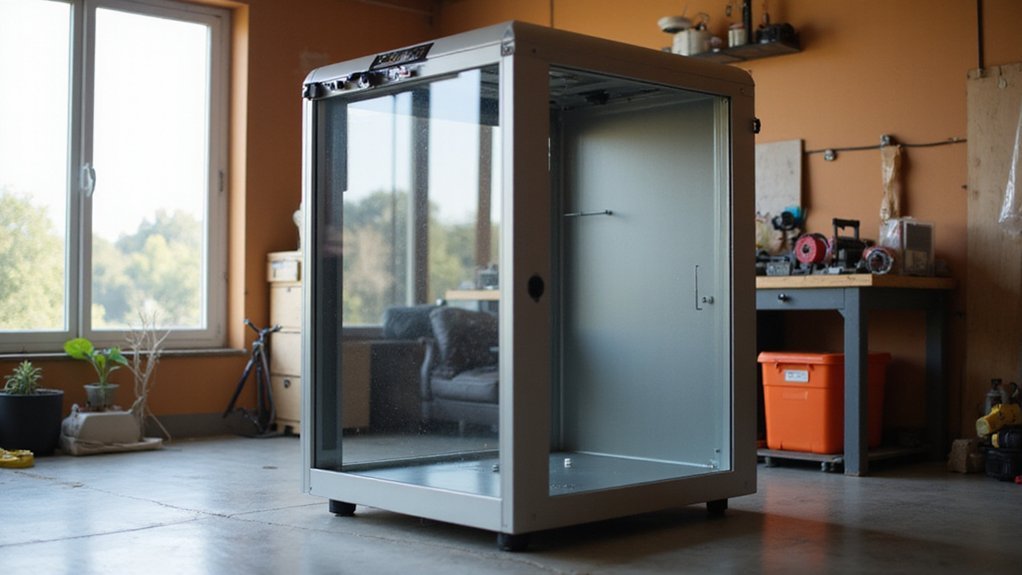
Choosing a 3D printer enclosure for your garage isn’t just about fitting the printer inside; you need to think about size and compatibility to make sure it matches your specific model. Ventilation is essential to keep fumes out and control heat, especially during longer prints, so consider your options carefully. And don’t forget about durability—your enclosure should stand up to the occasional bump or dust, plus features like noise reduction can make your workspace more comfortable.
Size and Compatibility
Getting the right size and ensuring compatibility are two of the most important steps when selecting a 3D printer enclosure for your garage. First, measure your printer’s dimensions—height, width, and depth—and add space for filament spools and cable management. Ideally, choose an enclosure that matches or exceeds these measurements to avoid tight fits or squeezing your printer in. Also, consider if you plan upgrades or modifications; internal space should support these comfortably. Don’t forget to measure your garage space, ensuring the enclosure fits without crowding other equipment. And, if you want to move or store it easily, check the weight and portability. After all, a bulky enclosure that’s hard to relocate isn’t much help when you’re enthusiastic to start printing!
Ventilation Options
Ventilation options are a key consideration when selecting a 3D printer enclosure for your garage—after all, nobody wants to breathe in fumes all day! Good ventilation keeps fumes, dust, and odors at bay, which is especially important in smaller spaces. Look for enclosures with adjustable fans or multi-layer filters that can handle these emissions without disrupting your temperature stability. Some models even have manual or automatic vent controls, letting you purge fumes after a print or during high-emission activities. Proper ventilation doesn’t just improve air quality; it also extends filament life by reducing moisture and heat-related issues inside the enclosure. And if safety’s your priority, consider enclosures with external exhaust systems to keep everything safely vented outside your garage.
Material Durability
When it comes to safeguarding your 3D printer in a garage setting, material durability should be at the top of your checklist. You want an enclosure that withstands wear and tear, so look for sturdy materials like reinforced plastics, heavy-duty metal, or fire-resistant fabrics. These choices resist corrosion, meaning your enclosure stays strong even with humidity or dust. Temperature fluctuations are common in garages, so opt for materials that won’t warp or crack over time. Impact resistance is key, especially if your garage’s layout leads to accidental bumps or knocks—sturdy, impact-resistant materials protect your printer from damage. And for added safety, materials that are flame-resistant and dustproof reduce hazards, keep your printer cleaner, and extend the enclosure’s lifespan.
Filament Storage Needs
Have you ever had a spool of filament turn into a tangled mess or get ruined by humidity right when you’re about to print? If so, proper filament storage inside your enclosure makes all the difference. Keeping filament on sturdy rods or in dedicated compartments helps stay organized and speeds up your workflow. Features like integrated feed-through ports let you switch between colors or materials without opening the box, saving time and reducing dust exposure. Speaking of dust, a dustproof environment is essential—it keeps your filament clean and avoids clogs or failed prints. Plus, controlling temperature and humidity inside your enclosure extends filament lifespan and guarantees consistent quality. When choosing an enclosure, prioritize those with features like dedicated storage space and environmental controls—they’re critical for hassle-free 3D printing.
Noise Reduction Features
If you’ve ever been in a garage with a 3D printer running, you already know how loud those machines can be — and it’s not just background noise. To keep your space more comfortable, look for enclosures with soundproof or noise-reducing features. Thick walls, sealed sides, and vibration dampers all help block the noise from escaping. Rubber gaskets can seal contact points, reducing vibrations and sound transmission. Some enclosures even have insulation inside the panels that absorbs sound waves, making your workspace quieter. Plus, a noise-insulating exterior can keep the noise from bothering others in your household or neighbors. By choosing an enclosure with these features, you’ll enjoy smoother, quieter printing sessions and a more peaceful garage environment.
Ease of Assembly
Getting your enclosure put together should be the easiest part of setting up your 3D printing station, especially in a busy garage where time and space are limited. Look for enclosures that require minimal tools—preferably just a Phillips screwdriver—and can be assembled in minutes. Some come with pre-numbered parts and clear, illustrated instructions, saving you from puzzle-like frustration. Lightweight materials or modular designs make setup quick and disassembly even easier if you need to move things around. The fewer components you have to manage, the better—complicated locking mechanisms slow everything down. Bonus points if your enclosure offers detailed video guides or customer support; they turn what could be a chore into a quick, confidence-boosting task.
Environmental Control
Controlling the environment inside your 3D printer enclosure is essential—especially if you’re working in a garage where temperature swings and humidity can be unpredictable. You want a setup that maintains a steady temperature, preventing issues like warping, cracking, or poor layer adhesion. Look for enclosures with features like active dehumidification and adjustable temperature controls, so you can fine-tune conditions based on filament type. Proper environmental management also reduces moisture buildup, which is particularly beneficial for sensitive filaments like ABS or nylon. Many enclosures offer customizable climate settings, allowing you to create the perfect environment for different projects. This way, dust and humidity stay at bay, extending filament life and ensuring your prints come out consistent and high quality every time.