When it comes to safe, smell-free 3D printing, choosing the right enclosure with ventilation is essential. You want something that not only contains odors and fumes but also offers good airflow, easy access, and durability. Whether you opt for a dedicated printer enclosure, one with adjustable exhaust fans, or models with smart sensors and transparent windows, the right setup can make a huge difference in your workspace. And there’s plenty more to evaluate before making a choice—so let’s explore what the top options offer.
| 3D Printer Enclosure for Bambu Lab A1 Combo |  | Best Overall | Ventilation: 8025 fan ventilation kit | Compatibility: Bambu Lab A1 w/ AMS Lite (32.48” cube) | Observation Window: Built-in LED lighting, no window | VIEW LATEST PRICE | Read Our Analysis |
| Crafit 3D Printer Cabinet with Filament Storage | 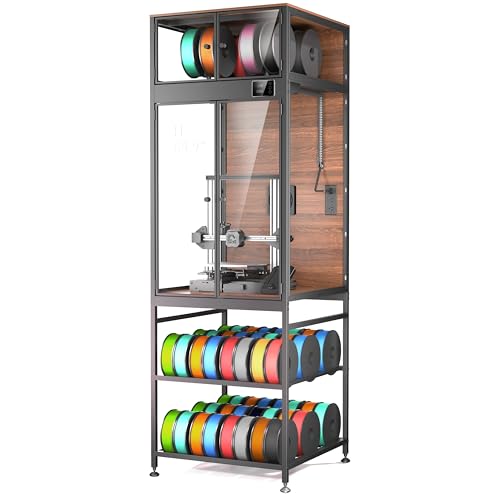 | Best Storage & Organization | Ventilation: High-flow manual fan | Compatibility: Printers up to 21.6”W x 22”D x 28.7”H | Observation Window: PET high-clarity panels, internal LED | VIEW LATEST PRICE | Read Our Analysis |
| Resin 3D Printer Enclosure with Ventilation Filter |  | Best Odor Control | Ventilation: Exhaust fans with expandable pipes | Compatibility: Smaller printers, max 28×18×17 inches | Observation Window: Large PVC observation window | VIEW LATEST PRICE | Read Our Analysis |
| Multifunctional Resin 3D Printer Enclosure with Ventilation |  | Most Versatile | Ventilation: Built-in carbon filter with exhaust fans | Compatibility: Fits two resin printers, size varies | Observation Window: Transparent PVC with LED lighting | VIEW LATEST PRICE | Read Our Analysis |
| 3D Printer Enclosure with Fan Air Quality & LED | 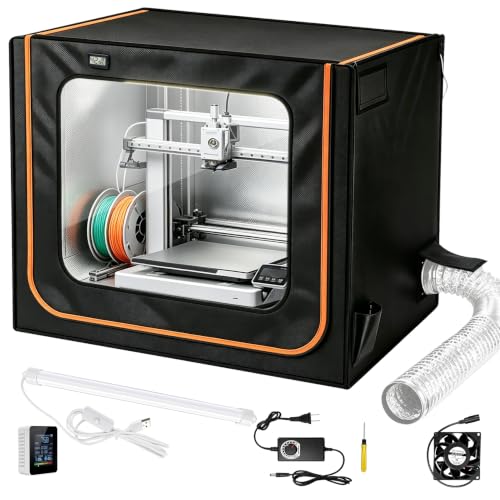 | Best for Multi-Printer Setups | Ventilation: Active speed-regulating fan with exhaust duct | Compatibility: Enclosures for various resin/FDM printers | Observation Window: Transparent PVC window with USB LED light | VIEW LATEST PRICE | Read Our Analysis |
| VEVOR 3D Printer Enclosure with Ventilation | 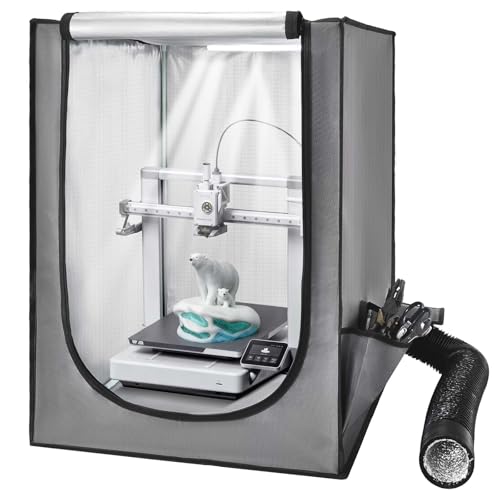 | Easy Setup & Monitoring | Ventilation: Ventilation system with smoke/dust expulsion | Compatibility: Small LCD resin and FDM printers (approx. 22”x25”x30”) | Observation Window: Large transparent window with LED | VIEW LATEST PRICE | Read Our Analysis |
| VEVOR 3D Printer Enclosure with Ventilation and Waterproof |  | Compact & Waterproof | Ventilation: Ventilation system to expel smoke, dust, and gases | Compatibility: Bambu Lab A1 Combo (31.5”x22.83”x22.83”) | Observation Window: Transparent window with LED light | VIEW LATEST PRICE | Read Our Analysis |
More Details on Our Top Picks
3D Printer Enclosure for Bambu Lab A1 Combo
If you’re looking for a reliable enclosure that seamlessly fits the Bambu Lab A1 Combo, this option truly stands out. Designed specifically for the A1 with AMS Lite, it measures roughly 32.48 inches on each side — big enough to keep your printer cozy without feeling cluttered. Keep in mind, if you’re planning to use it without the AMS Lite, external spools on top might not fit easily. The enclosure’s fireproof and dustproof materials make it safe and clean, while the built-in 8025 fan ensures smoke and dust are expelled efficiently. Bright LED lighting lets you watch your print in perfect clarity, all while maintaining noise levels down.
- Ventilation:8025 fan ventilation kit
- Compatibility:Bambu Lab A1 w/ AMS Lite (32.48” cube)
- Observation Window:Built-in LED lighting, no window
- Material:Fireproof, dustproof material
- Size:32.48×32.48×32.48 inches
- Additional Features:Built-in LED lighting, noise reduction
- Additional Feature:Bright LED lighting
- Additional Feature:Fireproof construction
- Additional Feature:Keeps dust out
Crafit 3D Printer Cabinet with Filament Storage
Looking for a 3D printer enclosure that offers solid organization and efficient filament management? The Crafit 3D Printer Cabinet with Filament Storage might just be your new best friend. It’s spacious enough for printers up to 21.6 by 22 inches in width and depth, and up to nearly 29 inches tall. Made with a sturdy carbon steel frame and composite walls, it dampens vibrations and cuts down noise by about 40%. Plus, it holds 48 spools on sturdy rods with a top compartment for eight, keeping your filaments dust-free and ready to go. The high-flow fan, adjustable for fumes or temperature control, adds extra peace of mind during long prints.
- Ventilation:High-flow manual fan
- Compatibility:Printers up to 21.6”W x 22”D x 28.7”H
- Observation Window:PET high-clarity panels, internal LED
- Material:Carbon steel frame, composite walls
- Size:23x23x70 inches
- Additional Features:Filament storage, multi-material ports
- Additional Feature:Multi-material spool ports
- Additional Feature:Vibration dampening frame
- Additional Feature:Clear PET panels
Resin 3D Printer Enclosure with Ventilation Filter
If you’re working with resin 3D printers and want to keep odors under control, a resin enclosure with a ventilation filter is the way to go. This enclosure features a built-in carbon filter sheet that adsorbs and eliminates resin smells, keeping your space fresh. It also has exhaust fans and expandable pipes to efficiently vent out toxic gases—no need to worry about indoor air quality. The six-sided design offers dust protection and contains resin splashes, while a large, transparent PVC window lets you watch your print progress without opening the enclosure. Plus, internal heat insulation helps maintain consistent temperatures, boosting print quality and precision.
- Ventilation:Exhaust fans with expandable pipes
- Compatibility:Smaller printers, max 28×18×17 inches
- Observation Window:Large PVC observation window
- Material:PVC and lightweight material
- Size:17x18x28 inches
- Additional Features:Odor filtration, temperature stability
- Additional Feature:Odor elimination system
- Additional Feature:Resin splash protection
- Additional Feature:Internal heat insulation
Multifunctional Resin 3D Printer Enclosure with Ventilation
The Multifunctional Resin 3D Printer Enclosure with Ventilation stands out as the most versatile choice for those who want a thorough, all-in-one solution. It can hold two resin printers and curing machines inside its spacious 30 by 19.7 by 28.3-inch frame, perfect for LCD resin and UV printers. The built-in carbon filter absorbs nasty odors, and exhaust fans with expandable pipes help vent out harmful gases. Plus, a large PVC window lets you watch your print in progress without opening the door. With LED lighting, dustproof design, and temperature control, this enclosure keeps your workspace clean, quiet, and stable. It’s a true all-in-one hero for serious resin printing.
- Ventilation:Built-in carbon filter with exhaust fans
- Compatibility:Fits two resin printers, size varies
- Observation Window:Transparent PVC with LED lighting
- Material:Durable lightweight PVC
- Size:Internal approx. 30×19.7×28.3 inches
- Additional Features:Multiple printers, gas detection
- Additional Feature:Dual printer capacity
- Additional Feature:Gas detector included
- Additional Feature:Easy assembly design
3D Printer Enclosure with Fan Air Quality & LED
A ventilated enclosure with air quality monitoring is an excellent choice if you’re juggling multiple 3D printers at once. It keeps your workspace safe and smell-free while giving you peace of mind. This type of enclosure usually measures around 31 by 21 by 28 inches, which fits many popular printers like the Creality Ender3 V3 or the Bambu Lab A1 series. It has an active ventilation system with a quiet fan and a retractable duct that extends up to 6.5 feet, pulling fumes outside. Plus, real-time sensors track CO₂, formaldehyde, and VOCs, helping you maintain healthy air, all while the LED light keeps your prints perfectly visible.
- Ventilation:Active speed-regulating fan with exhaust duct
- Compatibility:Enclosures for various resin/FDM printers
- Observation Window:Transparent PVC window with USB LED light
- Material:Oxford cloth, aluminum foil lining
- Size:31×21×28 inches
- Additional Features:Air quality sensors, temperature/humidity monitoring
- Additional Feature:Real-time air sensors
- Additional Feature:Retractable exhaust duct
- Additional Feature:Moisture-resistant Oxford cloth
VEVOR 3D Printer Enclosure with Ventilation
Looking for an enclosure that’s easy to set up and monitor without fuss? The VEVOR 3D Printer Enclosure with Ventilation is a smart choice. It features a large transparent window with LED lighting, so you can see your print in action, even in low light. It creates a steady temperature environment to reduce warping and cracking, boosting print quality. Its ventilation system quickly expels smoke and harmful gases, keeping your workspace safer. Made from waterproof, dustproof Oxford cloth, it’s durable and safe. With dimensions of approximately 21.65 x 25.59 x 29.53 inches, it fits many small LCD resin and FDM printers—just measure first!
- Ventilation:Ventilation system with smoke/dust expulsion
- Compatibility:Small LCD resin and FDM printers (approx. 22”x25”x30”)
- Observation Window:Large transparent window with LED
- Material:Waterproof, dustproof Oxford cloth
- Size:21.65×25.59×29.53 inches
- Additional Features:LED lighting, temperature control
- Additional Feature:Flame-retardant materials
- Additional Feature:Waterproof design
- Additional Feature:Bright interior LED
VEVOR 3D Printer Enclosure with Ventilation and Waterproof
If you’re after a compact and waterproof enclosure that keeps your 3D printer safe while providing good ventilation, the VEVOR S0004 is a smart choice. Designed specifically for the Bambu Lab A1 Combo, it measures 31.5 by 22.83 by 22.83 inches—big enough for indoor printing. Made from flame-retardant 600D Oxford cloth, it’s lightweight at just 5 pounds and water-resistant. It includes a ventilation system to clear smoke and dust quickly, plus a transparent window and LED light for easy monitoring. Whether printing with PLA, TPU, or ABS, this enclosure helps prevent warping, deterring accidents and keeping your workspace cleaner and safer.
- Ventilation:Ventilation system to expel smoke, dust, and gases
- Compatibility:Bambu Lab A1 Combo (31.5”x22.83”x22.83”)
- Observation Window:Transparent window with LED light
- Material:Oxford cloth, flame-retardant
- Size:31.5×22.83×22.83 inches
- Additional Features:Water-resistant, flame-retardant
- Additional Feature:Rapid cooling system
- Additional Feature:Water-resistant fabric
- Additional Feature:Flame-retardant construction
Factors to Consider When Choosing a 3D Printer Enclosure With Ventilation
When choosing a 3D printer enclosure with ventilation, you want to think about how well it fits your specific printer size, because a snug fit keeps everything running smoothly. Next, consider the ventilation efficiency—does it remove fumes effectively without creating drafts that mess with your print quality? And don’t forget about how durable the material is, how well it keeps the temperature steady, and how easy it is to set up, because these details can make a big difference in your printing experience.
Compatibility With Printer Size
Choosing the right enclosure size is essential for ensuring your 3D printer fits comfortably and operates smoothly. First, measure your printer’s maximum width, depth, and height. Compare these measurements to the enclosure’s interior dimensions—make sure there’s enough space so you’re not squeezing the printer in or leaving it swimming in a shoebox. Don’t forget about accessories like filament spools or print beds, which can add to the required size. Check if the enclosure’s opening mechanisms work with your setup or placement preferences. And if you plan to upgrade or switch to a different printer later on, make sure the enclosure can accommodate those changes. A little extra space now saves a lot of hassle down the line and keeps your workspace neat and safe.
Ventilation Efficiency
Ventilation efficiency in a 3D printer enclosure hinges on a few key factors that can make or break your filtering setup. First, the type and power of your exhaust fans matter—stronger fans remove fumes faster, but they need adjustable controls so you don’t overdo it. And don’t forget expandable piping or ducts; they give you flexibility for better air flow and increased discharge. Proper placement and sealing of vents are critical, ensuring fumes escape completely while preventing leaks into your workspace. Also, regular maintenance, like cleaning filters and checking fans, keeps everything running smoothly. And trust me, a well-maintained system saves you from unpleasant surprises, especially during long, smell-heavy prints. Keep these factors in mind, and your enclosure will be both efficient and safe!
Material Durability
Material durability is a crucial aspect to evaluate because your enclosure needs to withstand the daily rigors of 3D printing without falling apart. You want materials that can handle the heat, impacts, and wear that come with frequent use. Look for durable fabrics like flame-retardant Oxford cloth or reinforced PVC—they’re tough and resistant to tears, making sure your enclosure stays intact. High-quality enclosures also feature heat-resistant components to cope with prolonged exposure to high temperatures during long printing sessions. Plus, waterproof and dustproof materials protect your setup from environmental damage and dust accumulation. Think of these durable materials as the armor for your printer—protecting your investment and ensuring your enclosure remains reliable over countless printing cycles. You’re investing in longevity and safety!
Temperature Regulation Capabilities
Maintaining the right temperature inside your 3D printer enclosure is essential for achieving high-quality prints and avoiding common issues like warping or filament jams. An enclosure with good temperature regulation helps keep the environment stable, which is especially important if you’re working with high-temp filaments or resin.
Look for enclosures with features like insulation to retain heat, preventing sudden temperature drops that cause cracking. Some models include temperature sensors and climate control systems that offer real-time adjustments, so your environment stays consistent. Ventilation plays a big role too, helping balance airflow and temperature, reducing hot spots or drafts.
Ease of Setup
Setting up a 3D printer enclosure with ventilation doesn’t have to feel like assembling a spaceship. Look for designs with clear instructions and included tools—this saves time and spares frustration. Modular or collapsible components are your friends; they make assembly quicker and less of a puzzle. Lightweight yet durable materials, like thin aluminum or sturdy acrylic, make handling easier without sacrificing strength. Pre-drilled holes and simple fastening mechanisms take away guesswork—no wandering around trying to align tiny screws. And, if instructions aren’t your thing, some enclosures come with detailed setup videos or responsive customer support to guide you. Remember, a little preparation goes a long way—so pick an enclosure designed for easy assembly and you’ll be up and running before you know it!
Safety Features Included
When choosing a 3D printer enclosure with ventilation, safety features should be at the top of your list—these are what keep your workspace secure and your prints worry-free. Look for enclosures made with fireproof materials to reduce fire hazards, especially when dealing with high temperatures. Ventilation systems with exhaust fans and filters help eliminate harmful fumes and particles, protecting your health and cleaning the air. Enclosures with smoke, dust, and odor filters create a healthier environment by containing hazardous emissions. Secure access points and reinforced walls prevent accidental contact with hot or moving parts, keeping you safe. And features like transparent windows and LED lighting allow you to monitor your prints visually without risking burns or accidents. These safety additions make your setup both smarter and safer!
Dust and Fume Control
Fumes and dust are sneaky troublemakers that can quickly turn a good print into chaos if not managed properly. You want your enclosure to feature built-in air filtration systems, like carbon filters or activated carbon sheets, to trap unpleasant fumes and odors. Proper ventilation also helps disperse harmful chemicals—think VOCs and toxic fumes—that can make indoor air unsafe. Adjustable fans with exhaust pipes allow you to control airflow, keeping fumes at bay and your workspace fresh. Sealed enclosures with efficient ventilation maintain dustproof conditions and stable temperatures for consistent printing. And if you really want to stay on top of things, consider models with integrated air quality sensors. They give you real-time feedback, so you’re never caught off guard.
Additional Monitoring Options
Adding extra monitoring options to your 3D printer enclosure can make a big difference in ensuring smooth, safe, and successful prints. Integrated sensors and cameras help you keep an eye on things without opening the enclosure, saving time and reducing risks. Environmental sensors track temperature, humidity, and gas levels, giving you real-time data so you can prevent print failures caused by improper conditions. Cameras let you remotely view and record your print progress, which is handy for troubleshooting or catching issues early. Plus, monitoring systems with alarms or notifications can alert you instantly if something goes wrong, like sudden temperature changes or harmful gas buildup. And the best part? Many enclosures support third-party devices or software, giving you even greater control over your printing environment.