Imagine opening the box and feeling the thrill of transforming plain vinyl into stunning designs with ease. Whether you’re a beginner or a seasoned pro, choosing the right vinyl cutting machine can seem overwhelming—there are endless options, each promising simplicity and precision. Today, you’ll find seven top contenders that balance user-friendly features, software versatility, and versatile cutting sizes. From compact models perfect for small decals to heavy-duty cutters suited for large banners, each one can make your creative visions a reality—if you know what to look for.
| Cricut Maker 4 Starter Kit for Beginners |  | Best Beginner Kit | Material Compatibility: Vinyl, heat transfer vinyl, metal, plastic | Cutting Width: 12 inches (active surface 144 sq in) | Connectivity/Software: Cricut Design Space (software) | VIEW LATEST PRICE | Read Our Analysis |
| Likcut Vinyl Cutter for DIY Custom Stickers and Crafts |  | Most Innovative | Material Compatibility: Over 46 materials including vinyl, cardstock, heat transfer transfers, smart materials | Cutting Width: Up to 4.5 inches wide | Connectivity/Software: Mobile, tablet, PC, AI commands | VIEW LATEST PRICE | Read Our Analysis |
| Brother ScanNCut SDX125E Cutting Machine with 682 Patterns |  | Versatile Advanced | Material Compatibility: Paper, vinyl, fabric, foam, wood, felt | Cutting Width: 12 inches (active surface 144 sq in) | Connectivity/Software: USB, wireless (Wi-Fi), Canvas Workspace | VIEW LATEST PRICE | Read Our Analysis |
| VEVOR 34-Inch Vinyl Cutter Bundle with Supplies |  | Professional Precision | Material Compatibility: Vinyl, heat transfer vinyl, paper, craft paper, cardstock, paint masks | Cutting Width: 34 inches (max paper feed 28.3 inches) | Connectivity/Software: USB, software bundle, optional software | VIEW LATEST PRICE | Read Our Analysis |
| Likcut Vinyl Cutter S501 for Crafts & Stickers | 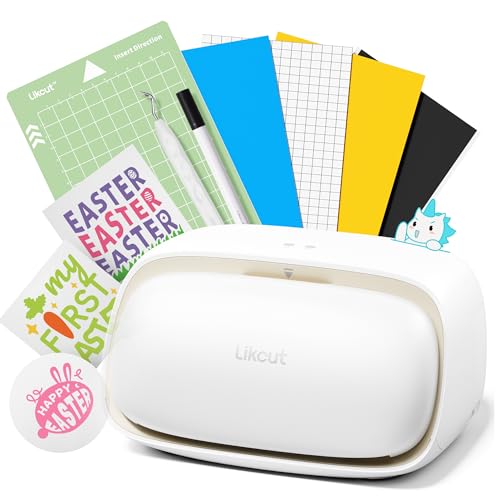 | AI-Powered Ease | Material Compatibility: Over 50 materials including cardstock, glossy film, labels | Cutting Width: Approximately 7 inches (active surface 180 sq in) | Connectivity/Software: Bluetooth 5.0, USB-C, Likcut Design Store | VIEW LATEST PRICE | Read Our Analysis |
| VEVOR 28-Inch Vinyl Cutter with Software Bundle |  | Heavy-Duty Performance | Material Compatibility: Vinyl, heat transfer vinyl, paper, craft paper, cardstock | Cutting Width: 28 inches (max feed 28.3 inches) | Connectivity/Software: USB, SignMaster software | VIEW LATEST PRICE | Read Our Analysis |
| Brother ScanNCut SDX85C Cutting Machine with Patterns | 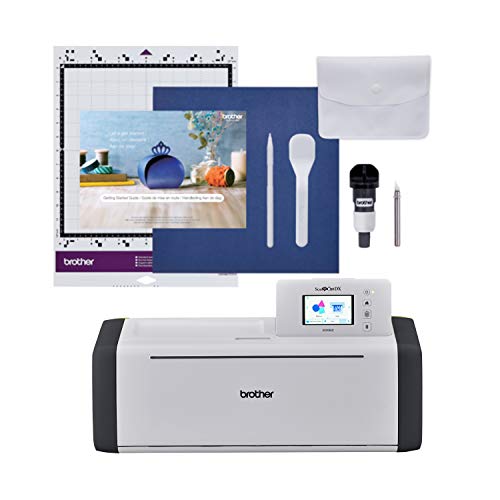 | Compact Versatility | Material Compatibility: Vinyl, fabric, paper, foam, chipboard, balsa wood | Cutting Width: 28.8 inches (max feed 28.3 inches) | Connectivity/Software: USB, wireless, CanvasWorkspace | VIEW LATEST PRICE | Read Our Analysis |
More Details on Our Top Picks
Cricut Maker 4 Starter Kit for Beginners
If you’re just starting out and want a user-friendly kit that covers all the basics, the Cricut Maker 4 Starter Kit is an excellent choice. It comes with everything you need to jump into crafts right away, including the die-cutting machine, cutting mat, blades, and helpful tools. You’ll find sampler sheets of vinyl and heat transfer vinyl, perfect for tackling decals, shirts, and more. The machine supports a variety of materials like vinyl, metal, and plastic, giving you lots of creative options. Plus, with simple setup through Cricut Design Space, you can confidently design, cut, and produce projects quickly and easily.
- Material Compatibility:Vinyl, heat transfer vinyl, metal, plastic
- Cutting Width:12 inches (active surface 144 sq in)
- Connectivity/Software:Cricut Design Space (software)
- Scanner/Design Input:No scanner; manual design
- Size and Portability:Large (stationary), moderate weight
- User Target:Beginners and hobbyists
- Additional Feature:Beginner-friendly setup guides
- Additional Feature:Compatible with multiple materials
- Additional Feature:Supports diverse project types
Likcut Vinyl Cutter for DIY Custom Stickers and Crafts
The Likcut Vinyl Cutter stands out as one of the most innovative options for DIYers who love customizing stickers and crafts. It’s a compact, lightweight machine that transforms voice commands and text prompts into digital designs, making creative projects easier than ever. You can craft intricate handwritten text, shapes, or illustrations—no complicated software needed. It cuts over 46 materials including vinyl, cardstock, and iron-on transfers, with precision on up to 4.5-inch wide pieces. Connection is seamless via mobile, tablet, or PC, so you can craft anywhere. Plus, the device includes handy storage and a pen for drawing, perfect for family projects, labels, or small decals.
- Material Compatibility:Over 46 materials including vinyl, cardstock, heat transfer transfers, smart materials
- Cutting Width:Up to 4.5 inches wide
- Connectivity/Software:Mobile, tablet, PC, AI commands
- Scanner/Design Input:No scanner; AI voice/text design
- Size and Portability:Compact, portable
- User Target:DIY enthusiasts, families
- Additional Feature:Voice and text design input
- Additional Feature:Small tool storage slot
- Additional Feature:Suitable for family projects
Brother ScanNCut SDX125E Cutting Machine with 682 Patterns
Looking for a versatile advanced cutting machine that combines precision with user-friendly features? The Brother ScanNCut SDX125E might just be your new best friend. With a built-in scanner up to 600 DPI, you can turn your drawings and printed images into custom cut files — perfect for stickers, labels, or appliques. The 5-inch LCD touchscreen makes editing straightforward, while wireless connectivity streams your designs directly from your devices. It can cut materials up to 3mm thick, including fabric and wood, with an auto blade that adjusts automatically. Plus, with 682 preloaded patterns and support for USB and online designs, creativity truly has no limits.
- Material Compatibility:Paper, vinyl, fabric, foam, wood, felt
- Cutting Width:12 inches (active surface 144 sq in)
- Connectivity/Software:USB, wireless (Wi-Fi), Canvas Workspace
- Scanner/Design Input:Built-in scanner, can convert images into cut files
- Size and Portability:Medium, stationary
- User Target:Advanced hobbyists, crafters
- Additional Feature:Built-in scanner with 600 DPI
- Additional Feature:Auto blade detects thickness
- Additional Feature:Extensive design preloads
VEVOR 34-Inch Vinyl Cutter Bundle with Supplies
If you need professional precision in a vinyl cutter, the VEVOR 34-Inch Vinyl Cutter Bundle is a solid choice. This manual plotter offers a cutting width of 870mm (about 34 inches) for larger projects, with a maximum cutting width of 780mm (around 30.7 inches). It supports detailed work with a cutting precision of plus or minus 0.01mm. Its digital control panel, backlight LCD, and adjustable pressure and speed make operation straightforward. Plus, it comes with software, supplies, and tools that help you hit the ground running. Whether you’re crafting signs, decals, or heat transfers, this bundle is versatile and professional-grade.
- Material Compatibility:Vinyl, heat transfer vinyl, paper, craft paper, cardstock, paint masks
- Cutting Width:34 inches (max paper feed 28.3 inches)
- Connectivity/Software:USB, software bundle, optional software
- Scanner/Design Input:No scanner; file import via USB or software
- Size and Portability:Large, stationary
- User Target:Professional, hobbyists
- Additional Feature:Bundled vinyl rolls included
- Additional Feature:Digital control panel
- Additional Feature:Supports multiple file formats
Likcut Vinyl Cutter S501 for Crafts & Stickers
If you’re after an AI-powered vinyl cutter that combines ease of use with versatile design options, the Likcut S501 is a smart choice. It’s portable, with a sleek beige plastic build, making it perfect for crafting on the go. Connection is lightning-fast—just a few seconds via Bluetooth 5.0 or USB 2.0. You get access to over 1 million designs and 1,200 fonts through the Likcut Design Store, so creativity never runs dry. It supports both cutting and drawing on more than 50 material types with adjustable pressure, allowing for everything from stickers to paper crafts. And with AI image generation, creating custom designs is effortless and fun!
- Material Compatibility:Over 50 materials including cardstock, glossy film, labels
- Cutting Width:Approximately 7 inches (active surface 180 sq in)
- Connectivity/Software:Bluetooth 5.0, USB-C, Likcut Design Store
- Scanner/Design Input:No scanner; AI design via voice/text
- Size and Portability:Small, portable
- User Target:Beginners, casual crafters
- Additional Feature:AI image generation via voice
- Additional Feature:Dual operational modes
- Additional Feature:Built-in front storage compartment
VEVOR 28-Inch Vinyl Cutter with Software Bundle
The VEVOR 28-Inch Vinyl Cutter delivers heavy-duty performance, making it perfect for serious DIYers and small businesses. With a large 28-inch cutting area and a sturdy aluminum body, it’s built to last through all your projects. The cutter’s high-precision blade (accurate to 0.0004 inches) ensures crisp, clean cuts every time. Plus, the adjustable pressure and speed give you total control to customize for materials like vinyl, paper, or cardstock. Supported through USB or COM ports and compatible with SignMaster software on Windows, this bundle also includes five rolls of vinyl and various accessories—so you’re ready to start creating right away!
- Material Compatibility:Vinyl, heat transfer vinyl, paper, craft paper, cardstock
- Cutting Width:28 inches (max feed 28.3 inches)
- Connectivity/Software:USB, SignMaster software
- Scanner/Design Input:No scanner; file import from software
- Size and Portability:Large, stationary
- User Target:Hobbyists, professionals
- Additional Feature:Heavy-duty aluminum build
- Additional Feature:Comes with multiple blades and tools
- Additional Feature:Supports various design file formats
Brother ScanNCut SDX85C Cutting Machine with Patterns
Looking for a cutting machine that combines compact versatility with impressive features? The Brother ScanNCut SDX85C is a perfect fit. It’s an electronic DIY tool with a built-in scanner, making it easy to turn your hand drawings into cut files. With 251 built-in designs and a 3.5-inch LCD touchscreen, steering your projects feels intuitive. Plus, its auto blade sensor adjusts automatically, so you don’t have to fuss over material thickness. Whether you’re into paper crafts, vinyl wall art, or fabric appliques, this machine handles materials up to 3mm thick. Wireless connectivity and compatibility with Brother sewing machines make it a crafty powerhouse, all in a neat, lightweight package.
- Material Compatibility:Vinyl, fabric, paper, foam, chipboard, balsa wood
- Cutting Width:28.8 inches (max feed 28.3 inches)
- Connectivity/Software:USB, wireless, CanvasWorkspace
- Scanner/Design Input:Built-in scanner, digitize drawings
- Size and Portability:Large, stationary
- User Target:Hobbyists, educational users
- Additional Feature:251 built-in designs
- Additional Feature:Whisper-quiet operation
- Additional Feature:Compatible with fabric projects
Factors to Consider When Choosing a Cutting Machine for Vinyl
When choosing a vinyl cutting machine, think about the cutting width — you don’t want something too small or so big it’s awkward to handle. Material compatibility is also key: some machines work with a wide range of vinyl and other materials, while others are more specialized. And don’t forget about software — you want something user-friendly that syncs well with your design programs and supports the patterns you love to create!
Cutting Width Capabilities
Understanding cutting width is a crucial step when choosing a vinyl cutting machine because it directly impacts the size and complexity of your projects. If you plan on making large decals, banners, or multi-layer designs, look for a machine with a wider maximum cut width. Typically measured in inches or millimeters, this setting determines the largest design you can create in a single run. To avoid frustration, pick a machine with a cutting width that exceeds your usual project size—not just what you think you’ll do now. Keep in mind, wider machines take up more space and may need more storage. So, match the machine’s specs with your workspace and project goals for smooth, creative success!
Material Compatibility Range
Your choice of vinyl cutting machine depends greatly on its material compatibility range — a key factor to guarantee your projects turn out just right. You want a machine that supports all the materials you plan to work with, like vinyl, heat transfer vinyl, or even metallic sheets. Check the maximum thickness it can handle; for example, some machines cut through layers up to 2mm deep, perfect for thicker projects. Also, consider the width support—if you’re working on larger sheets, make sure the active surface accommodates them. Specialty materials like foil or reflective films sometimes need specific blades or settings, so verify compatibility beforehand. And don’t forget, a versatile machine should handle different textures and surfaces, giving you creative freedom without frustration.
Software Compatibility Options
Ever wondered if your vinyl cutting machine will play nicely with your computer or mobile device? It’s an essential step! First, check that the software suits your operating system — Windows or Mac — to keep connectivity smooth. Support for popular design file formats like SVG, PDF, or AI makes importing and exporting projects effortless. If you prefer working on a tablet or phone, look for wireless or Bluetooth options to cut cords and clutter. Also, consider what comes preloaded: a solid library of designs or access to online stores can really boost your creativity. And don’t forget features like design editing, pattern creation, and automatic adjustments — they streamline your workflow and make designing more fun than a box of glitter!
Ease of Use Features
When choosing a vinyl cutting machine, ease of use can make or break your crafting experience. Look for machines with user-friendly interfaces like touchscreens or simple software, so you don’t get lost in complex menus. Automated features such as auto blade detection and guided setup help reduce guesswork and ramp up efficiency. Connectivity matters too—wireless or USB options allow quick file transfers, so you spend less time fiddling and more time creating.
Choose models with clear instruction manuals or tutorials. The more intuitive the controls, the faster you’ll learn to operate and troubleshoot your machine. Prioritize devices with adjustable settings and minimal setup steps—crafting should be fun, not frustrating!
Design and Pattern Support
Getting the right designs onto your vinyl is half the fun, but not all machines are equally versatile when it comes to pattern support. To really release your creativity, look for a machine that offers a wide range of preloaded designs and patterns. Compatibility with file formats like SVG, PDF, or DXF is vital because they enable custom patterns and details that make your projects unique. Some devices even support importing hand-drawn images or scanning sketches—perfect if you love personal touches. Check if you can easily add new designs via external storage or wireless connections—no one wants to be tethered. And don’t forget about the design software; an extensive library and editing tools can turn a simple pattern into a masterpiece.
Connectivity Methods
Choosing the right connectivity method for your vinyl cutter is more than just about plugging in a cable or switching on Bluetooth; it’s about how seamlessly your device can work with your workspace and software. USB connections are reliable and ideal if you prefer a wired setup, especially for stationary crafting. Bluetooth, on the other hand, lets you craft wirelessly, offering quick setup and mobility—just keep your device nearby. Wi-Fi connectivity opens doors to remote file transfer, cloud-based software, and multi-device access, making workflow smoother and more flexible. Consider your workspace and how you want to operate; do you want freedom from cables or a stable wired connection? The right choice streamlines your creativity and saves frustration down the line.
Durability and Build Quality
Investing in a vinyl cutter means you’re counting on it to handle a variety of projects day after day, so durability and build quality matter more than you might think. A sturdy machine has a frame made from high-quality materials like steel or reinforced aluminum, which helps it withstand frequent use without bending or breaking. Look for precision-engineered parts that resist wear and keep cutting accurate over time. A well-built machine features reinforced rollers and a strong housing, so it can handle different materials without damage. And consider how easy it is to maintain and replace parts—this boosts longevity and prevents those annoying breakdowns that ruin your workflow. Bottom line: investing in quality construction means fewer headaches and more consistent results.
Price and Value
When you’re on the hunt for a vinyl cutting machine, cost often plays a big role, but it’s important to balance that with the value you’re getting. You want a machine that matches its price with solid features, sturdy build, and included accessories. For example, a pricier model might have advanced features like automatic blade detection or AI integration, which boost productivity and craft quality—worth considering if you’re serious. Don’t forget to factor in the cost of supplies, tools, and software, as these can add up over time. Check if the machine comes with a warranty and good customer support—these save you money and headaches down the line. In the end, a balance of affordability and durability often delivers the best bang for your buck!